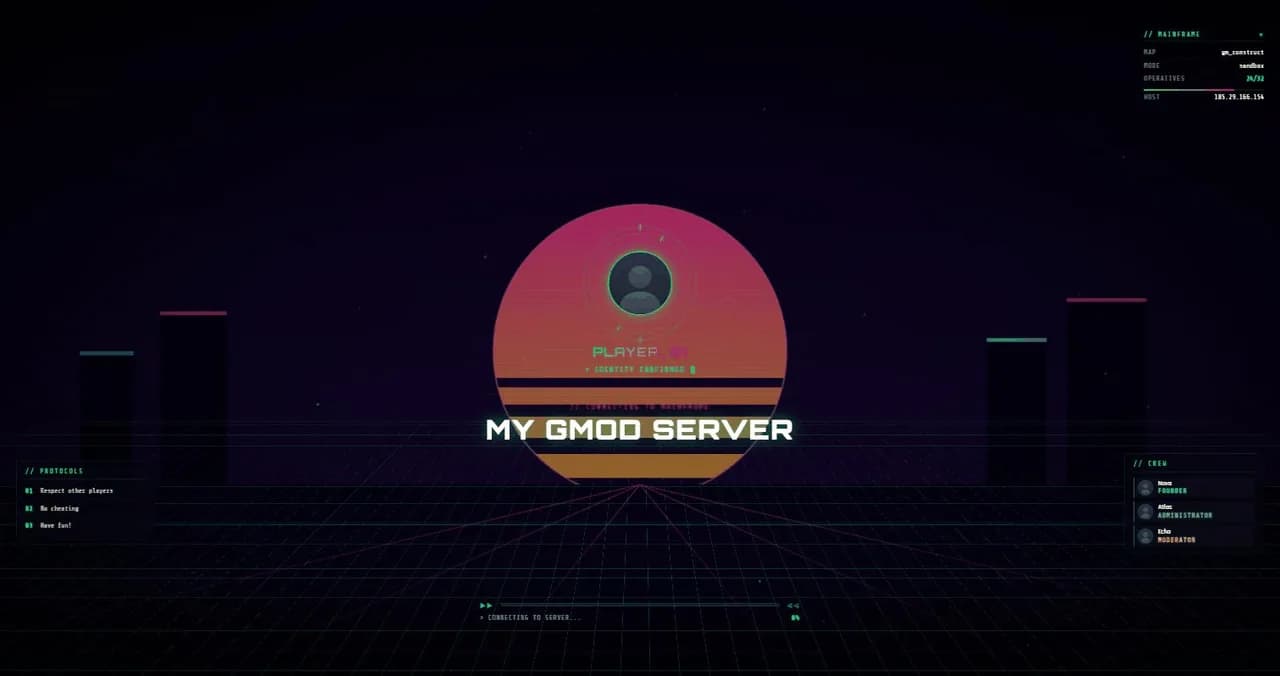
GModVisual loading screen creator

GMod Loading Screen Creator

Create a Garry's Mod loading screen that actually looks like your server. Lumescreen's loading screen creator is a live visual editor: every color, image, track and text block updates in a real preview as you type.

When you're done, your screen is already online — hosted by us, connected to your server with a single sv_loadingurl line.

  • Live preview while you edit
  • No PHP, no self-hosting
  • Free plan available

Creative control

Everything you can customize

A loading screen is the first thing new players see. The creator gives you full control over that first impression — without touching code.

01

Colors & branding

Accent colors, backgrounds, logo and typography per theme. Build a screen that matches your community's identity instead of a generic template.
02

Background slideshows

Upload multiple backgrounds and let them rotate. Images are compressed and converted to WebP automatically so loading stays fast.
03

Music player

Add background music with a mute button for players. Audio is compressed server-side to MP3 — no format headaches.
04

Staff roster

Present your team with names, colored roles and Steam avatars resolved automatically from their SteamID.
05

Server rules

Display your rules while players wait — they arrive on the server already knowing how to behave. Especially useful for DarkRP.
06

Live server data

Current map, gamemode, player count and the connecting player's own name and avatar are injected live on every connect.

Built for GMod

A creator that knows the constraints of the in-game browser

GMod renders loading screens in an embedded Chromium browser with real constraints: no clicks, no video, specific engine callbacks. Every Lumescreen theme is built and tested for exactly that environment.

01

Progress events wired in

Themes react to GMod's native download events — file count, current file, status — so players see real progress, not a fake spinner.
02

Readable from the couch

Large type, strong hierarchy and safe margins around GMod's own download box. Your screen stays legible at every resolution.
03

Autoplay done right

GMod's browser allows audio autoplay; browsers on the dashboard preview don't. The creator handles both, so what you hear in preview matches the game.

FAQ

Frequently asked questions

What makes this different from a loading screen maker template?
Templates give you fixed HTML you must host and edit by hand. The creator is a live editor on top of hosted infrastructure: you see changes instantly, and hosting, compression and server data are handled for you. See the hosted maker overview for the full comparison with self-hosted setups.
Can I preview the screen before putting it on my server?
Yes. The editor shows a full live preview with mock player data, and your screen has a shareable URL you can open in any browser before touching server.cfg.
Can I switch themes later without redoing everything?
Yes. Your configuration (music, staff, rules, images) is stored independently — switch themes and your content carries over wherever the theme supports it.
Is there a free plan?
Yes — one loading screen with the free themes, hosted, with basic analytics. Compare plans on the pricing page.

Ready to impress your players?

Create your first loading screen for free. No credit card, in just a few minutes.