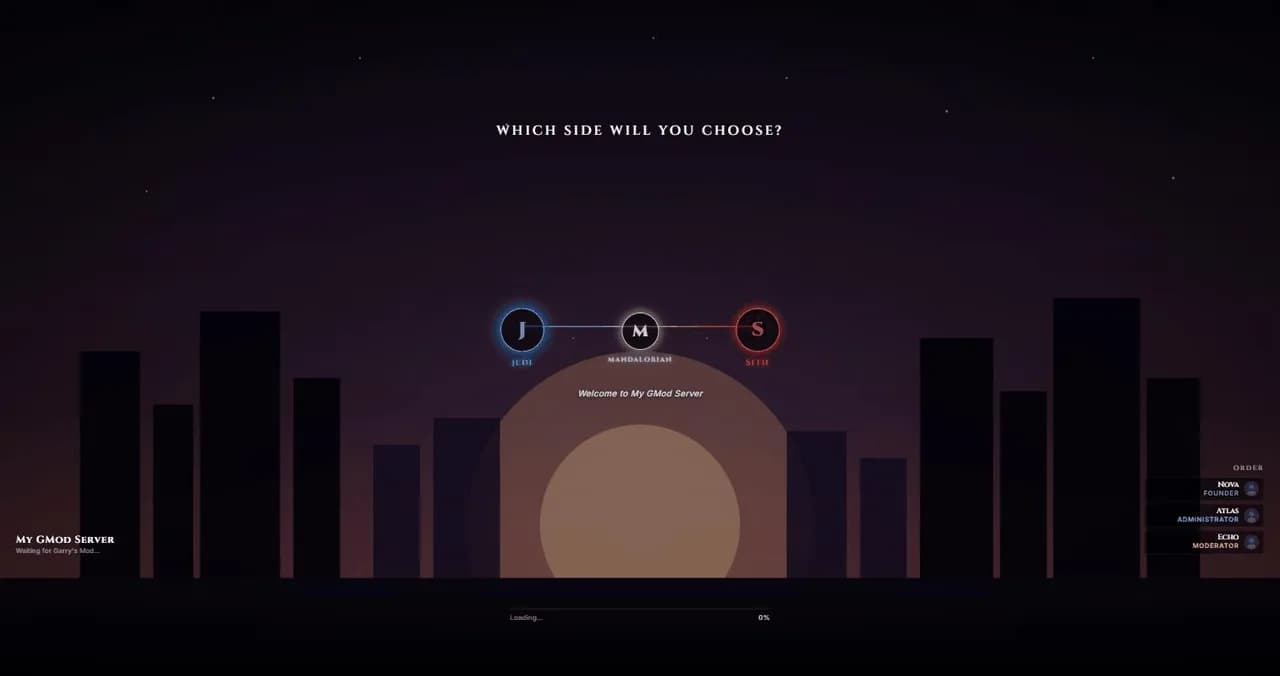
GModOnline loading screen maker

GMod Loading Screen Maker

Lumescreen is an online GMod loading screen maker: pick a theme, customize it in a live visual editor, and get a hosted URL for your Garry's Mod server. No web server to rent, no PHP to configure, no HTML to write.

Every color, image, track and text block updates in a real preview as you edit. When you're done, your screen is already online: paste one sv_loadingurl line into server.cfg and every player sees it on their next connect.

  • Free to start, no credit card
  • Hosting included
  • Set up in under 5 minutes

Why a hosted maker

Everything a self-hosted template can't do

Free GitHub templates and PHP scripts still require a web server, an SSL certificate and maintenance. A hosted maker removes all of it.

01

No web server required

Self-hosted loading screens need a rented web server with PHP and an SSL certificate. Lumescreen hosts everything, so your screen stays online even when you're not looking.
02

Real-time analytics

See how many players load your screen, how many finish loading and how long it takes. No static template can give you that data.
03

10 designed themes

From minimal to cinematic, tactical and community styles, every theme is built for GMod's in-game browser and stays readable at any resolution. Browse the gallery.
04

Always up to date

When GMod or its embedded browser changes, we update the rendering engine, so your screen never silently breaks.

Creative control

Everything you can customize

A loading screen is the first thing new players see. The maker gives you full control over that first impression without touching code.

01

Colors & branding

Accent colors, backgrounds, logo and typography per theme. Build a screen that matches your community's identity instead of a generic template.
02

Background slideshows

Upload several backgrounds and let them rotate. Images are compressed and converted to WebP automatically so loading stays fast.
03

Background music

Add a soundtrack that starts with the loading screen. Audio is compressed server-side to MP3, so there are no format headaches.
04

Staff roster

Present your team with names, colored roles and Steam avatars resolved automatically from their SteamID.
05

Server rules

Display your rules while players wait, so they arrive on the server already knowing how to behave. Especially useful for DarkRP.
06

Live server data

Current map, gamemode, player count and the connecting player's own name and avatar are filled in live on every connect.

Built for GMod

Made for the constraints of the in-game browser

GMod renders loading screens in an embedded Chromium browser with real constraints: no mouse, no video, specific engine callbacks. Every Lumescreen theme is built and tested for exactly that environment.

01

Progress events wired in

Themes react to GMod's native download events (file count, current file, status), so players see real progress instead of a fake spinner.
02

Readable from across the room

Large type, strong hierarchy and safe margins around GMod's own download box. Your screen stays legible at every resolution.
03

Autoplay handled

GMod's browser plays audio automatically; regular browsers block it. The editor preview handles both, so what you hear in preview matches the game.

How it works

From zero to a live loading screen in three steps

01

1. Pick a theme

Choose one of 10 themes and see it live in the editor right away.
02

2. Make it yours

Colors, backgrounds, music, rules, staff roster, social links: the live editor shows every change as players will see it.
03

3. Paste one line

Copy your URL into sv_loadingurl in server.cfg and restart. Full walkthrough in our installation guide.

FAQ

Frequently asked questions

Is the loading screen maker really free?
Yes. The Free plan includes one loading screen with the free themes and basic analytics, hosted by us, with no time limit and no credit card. Premium unlocks every theme, unlimited loading screens and full analytics.
Do I need a web server or coding skills?
No. Unlike self-hosted templates, Lumescreen hosts your screen on our infrastructure. You only paste one configuration line into your server.cfg file.
How do I connect the screen to my GMod server?
Set sv_loadingurl "https://lumescreen.com/ls/your-server?steamid=%s&mapname=%m" in garrysmod/cfg/server.cfg and restart the server. Our step-by-step guide walks through it.
Can I preview the screen before putting it on my server?
Yes. The editor shows a full live preview with sample player data, and your screen has a URL you can open in any browser before touching server.cfg.
Can I switch themes later without redoing everything?
Yes. Your content (music, staff, rules, images) is stored separately from the theme, so it carries over wherever the new theme supports it.
Will it work at any screen resolution?
Yes. Every theme is responsive and tested against GMod's in-game Chromium browser, from 1280×720 to ultrawide, including the margin GMod's own download box needs.

Ready to impress your players?

Create your first loading screen for free. No credit card, in just a few minutes.